Solving Lighthouse's "Trust and Safety" Warnings
Table of Contents
- Introduction
- What is a _headers file?
- Addressing Lighthouse Warnings
- securityheaders.com Audit
- Final Results
Introduction
During the process of creating this site and seeking the fabled perfect Lighthouse score, I noticed a warning under the “Trust and Safety” section that didn’t contribute to the overall result but still caught my eye: “Ensure CSP is effective against XSS attacks”.
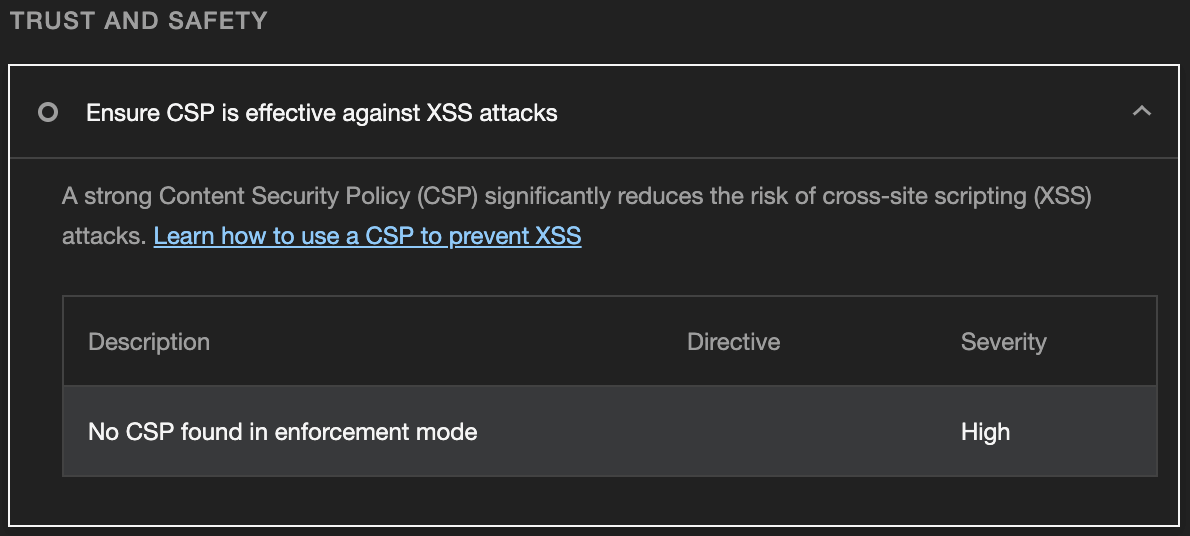
As someone who constantly strives for optimization, I immediately started researching how to solve it. After quite a bit of time Googling, tinkering, and reading, I was able to solve each warning Lighthouse displayed, in addition to achieving an “A” score on securityheaders.com .
In this article, I will be going through each Lighthouse warning, as well as how to leverage a securityheaders.com audit to improve your site’s security, and explain how to solve all of them using a _headers file.
What is a _headers file?
A _headers file is a plain text file that allows you to specify custom HTTP headers for your site. HTTP headers are bits of metadata sent with HTTP requests or responses that add additional context for a number of different reasons. For example, cache-control controls your site’s caching behavior.
To solve these security warnings, we will be using a _headers file to specify the values of the properties we need to address. To do this, create a plaintext file named “_headers” (with no extension) and place it at the root of your output folder. As someone using Cloudflare Pages for hosting, this meant I needed to place my file in the root of my public folder.
Addressing Lighthouse Warnings
Ensure CSP is effective against XSS attacks
From the linked Lighthouse resource , “A Content Security Policy (CSP) helps to ensure any content loaded in the page is trusted by the site owner. CSPs mitigate cross-site scripting (XSS) attacks because they can block unsafe scripts injected by attackers. However, the CSP can easily be bypassed if it is not strict enough.”
To solve this warning, we will be creating a rule in our _headers file called Content-Security-Policy. The directives required will likely be different for every site, but a good baseline would be setting it to Content-Security-Policy: default-src 'none';. This will by default disallow all resources for your site, preventing you from having to specify all other possible directives as none. However, this will also block everything, even the resources you need such as styles or scripts, so you will need to address each one on a case-by-case basis.
Here is an example of my full content-security-policy:
Content-Security-Policy: default-src 'none'; connect-src 'self'; img-src 'self'; script-src 'self' 'unsafe-inline';As mentioned above, my default-src is set to none to by default disallow all resources. From there, I am setting the directives that prevented my site’s content from loading to self to override the default value. For example, setting img-src 'self' allows my self-hosted images to load; without it, no images on my site would be allowed.
NOTE: I am only using unsafe-inline for my script-src because it is a requirement of Astro (the framework I am using for this site). In a typical implementation you would not want to do this .
Use a Strong HSTS Policy
From the linked Lighthouse resource , “Plaintext protocols such as HTTP can be vulnerable to eavesdropping attacks where an attacker is able to read the transmitted content. Luckily, Transport Layer Security (TLS) can encrypt the traffic and make it significantly harder for attackers to use this data if captured. However, it is possible for attackers to circumvent TLS by forcing encrypted connections to use plaintext HTTP. To address this problem, the HTTP Strict Transport Security (HSTS) response header was introduced which forces the user’s browser to visit a website only using TLS and not fall back to plaintext HTTP (for a set time).”
To solve this warning, we will be creating a rule in our _headers file called Strict-Transport-Security. This rule contains one required directive (max-age) and two optional directives (includeSubDomains and preload). The MDN reference page for Strict-Transport-Security covers each of these directives. For now, I am using the following recommended setting with the intention of updating it to support preload once development on my site is complete:
Strict-Transport-Security: max-age=31536000; includeSubDomainsEnsure proper origin isolation with COOP
From the linked Lighthouse resource , “Cross Origin Opener Policy (COOP) allows you to ensure that a top-level window is isolated from other documents by putting them in a different browsing context group, so that they cannot directly interact with the top-level window.”
To solve this warning, we will be creating a rule in our _headers file called Cross-Origin-Opener-Policy. Your usage may vary, but for me the optimal setting was same-origin. For more information, check out its MDN reference page .
Cross-Origin-Opener-Policy: same-originsecurityheaders.com Audit
Once you have addressed each of the Lighthouse warnings, I would recommend taking it a step further and audit your site with securityheaders.com . This site will scan your HTTP headers (free of charge) and provide feedback as to what additional headers you are missing and how to add them.
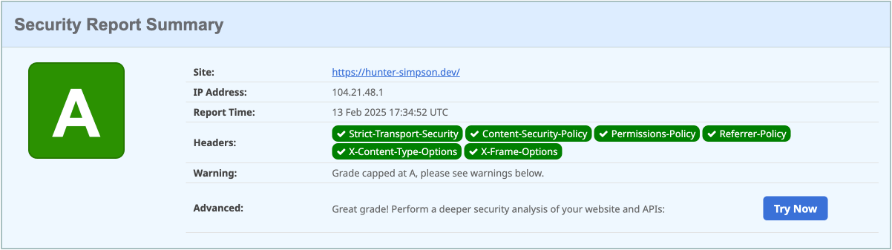
For me, there were an additional three headers I needed to set to improve my audit score: Access-Control-Allow-Origin, Permissions-Policy, and X-Frame-Options. Your results may be different depending on your hosting service and what headers are already included outside of your _headers file. Each missing header has pretty good documentation as to what it is and what values should be set, but for me this is what I needed to address all issues the audit discovered:
Access-Control-Allow-Origin: https://hsimpson.devPermissions-Policy: accelerometer=(), camera=(), geolocation=(), gyroscope=(), magnetometer=(), microphone=(), payment=(), usb=()X-Frame-Options: SAMEORIGINFinal Results
Below you will find my completed _headers file that addresses all Lighthouse warnings and securityheaders.com flags. Additionally, you can view the file on GitHub .
https://hsimpson.dev/* Access-Control-Allow-Origin: https://hsimpson.dev Content-Security-Policy: default-src 'none'; connect-src 'self'; img-src 'self'; script-src 'self' 'unsafe-inline'; style-src 'self' 'unsafe-inline'; Cross-Origin-Opener-Policy: same-origin Permissions-Policy: accelerometer=(), camera=(), geolocation=(), gyroscope=(), magnetometer=(), microphone=(), payment=(), usb=() Strict-Transport-Security: max-age=31536000; includeSubDomains X-Frame-Options: SAMEORIGINThis is far from an authoritative list on perfect HTTP headers security, but hopefully this solves the issue you were having if you ended up on this article, or at the very least encourages you to seek out more information about bettering your own site’s security.
Thanks for reading!